Seven ways to take orders
As of October 2026. We make VibeKitchen, so keep that in mind. We haven't run a shop on every service; the facts about other tools come from their public pages, checked October 10, 2026 and listed at the bottom. Prices are in US dollars.
Below, each option is compared on the same four points, with who it suits and its trade-off. Costs are in the next section.
Facebook or Instagram messages
- Buyers order on
- Message thread
- Pickup and preorders
- No You track it
- Takes payment
- No Separately
- Customer list export
- No No
Best for: A few orders a week from people who follow you.
Trade-off: You track orders, payments, and pickups by hand.
A form, like Google Forms
- Buyers order on
- Web form
- Pickup and preorders
- Partly You check capacity
- Takes payment
- No Separately
- Customer list export
- Yes Google Sheets
Best for: Collecting order requests.
Trade-off: A form entry is a request, not a paid order.
A website builder, like CottageCMS
- Buyers order on
- Your website
- Pickup and preorders
- Yes Built in
- Takes payment
- Yes Square
- Customer list export
- Partly Ask about export
Best for: A website you design yourself.
Trade-off: Custom domains, deposits, and quotes need a paid plan.
An online store, like Square or Shopify
- Buyers order on
- Your online store
- Pickup and preorders
- Partly Check your setup
- Takes payment
- Yes Built in
- Customer list export
- Partly Check settings
Best for: A full store with your own catalog and checkout.
Trade-off: Built for general retail. Plans and add-ons add up.
A marketplace app
- Buyers order on
- Their app or site
- Pickup and preorders
- Partly Varies
- Takes payment
- Partly Varies
- Customer list export
- Partly Ask first
Best for: Being listed where buyers already browse.
Trade-off: Listing doesn't guarantee orders. Commission and contact rules vary.
A drop tool, like Hotplate
- Buyers order on
- Web link
- Pickup and preorders
- Yes Drops and pickup windows
- Takes payment
- Yes Built in
- Customer list export
- Partly Ask about export
Best for: Scheduled menu drops with pickup windows.
Trade-off: You bring the buyers and schedule each drop.
Your own order link, like VibeKitchen (ours)
- Buyers order on
- Web link, no app or account
- Pickup and preorders
- Yes Ready Now, batches, made to order
- Takes payment
- Yes Stripe
- Customer list export
- Yes CSV
Best for: Ready-now food, planned batches, and made-to-order items from one link.
Trade-off: You bring the buyers. No shipping, deposits, quotes, or food-rule checks.
What it costs
| Option | Monthly | Per order, including card processing |
|---|---|---|
| Facebook or Instagram messages | Free | Cash: no fee. Payment apps set their own. |
| Google Forms | Depends on your Google plan | Depends on how you collect payment |
| CottageCMS | Free; Pro $20/mo or $200/yr; Scale $37/mo or $370/yr | Square processing (online API rate 2.9% + $0.30). The Free plan can add a CottageCMS fee (amount not published); Pro removes it. |
| Square | Free plan $0 | Free plan online: 3.3% + $0.30 |
| Shopify | Basic $39/mo, or $29/mo billed yearly | 2.9% + $0.30 with Shopify Payments; with another provider, a 2% Shopify fee plus theirs |
| Marketplace apps | Varies | Commission and processing vary |
| Hotplate | $0 | 5% + $0.55 service fee, shown to buyers (or the seller pays it). Seller pays 2.9% + $0.30 processing. |
| VibeKitchen | $0 | 5% + $0.50 service fee, paid by the buyer by default (or you absorb it). Plus Stripe card processing, 2.9% + $0.30 for standard US cards, from your payout. |
These are standard US rates for the plans named; premium and international cards cost more (Stripe's pricing, checked October 10, 2026). Passing VibeKitchen's service fee to the buyer doesn't cover Stripe's fee, which still comes out of your payout.
Choose on how you sell, not on fees alone. When you set prices, count app and card fees as a cost, like ingredients and packaging; the baked goods pricing calculator does the math.
When messages or a form are enough
A few orders a week? A post and your DMs can work. Keep a simple list of who paid and when they're picking up.
A form is the next step up; the bakery order form guide lists what to ask. Move to an ordering tool when you need a hard limit on how many you sell, or payment before you start cooking.
Finding buyers is a separate job. The sell food online guide covers how one ordering link fits with your social posts.
Moving from Castiron or another tool
Castiron is the common case. As of October 2026, the public record is a November 21, 2024 announcement that T.D. Jakes Enterprises acquired Castiron to launch Nourysh. It doesn't say what happened to individual seller accounts, so check yours directly.
To switch any tool without losing orders:
- Save what you can: menu, prices, photos, customer contacts you have permission to use, and any orders you still owe.
- Rebuild your menu in the new tool, then place a test order the way a buyer would.
- Tell your customers where to order now, and update the link in your profiles and on printed signs.
A new link doesn't bring old orders with it, so keep your own list of paid orders and pickups while you switch.
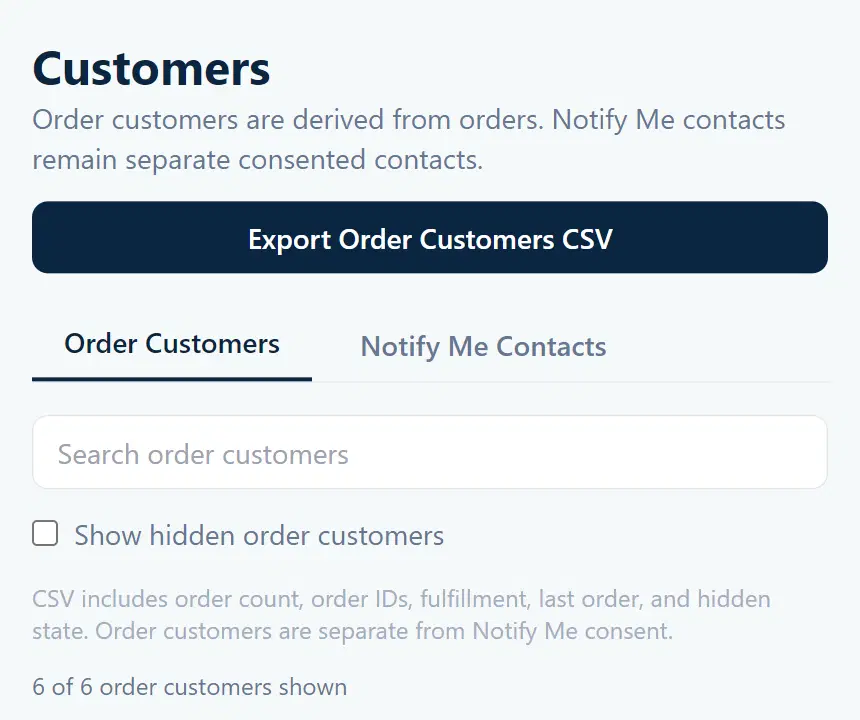
VibeKitchen can't import from another platform; you add your menu by hand. After that, order customers export to CSV with names, emails, phone numbers, and order IDs. Notify Me sign-ups, which are only on sold-out Ready Now items, export to their own CSV with consent details.
Website builder or an order link?
Pick CottageCMS if you want a website you design, or need its quote and deposit tools on a paid plan. Pick VibeKitchen if your menu fits Ready Now, Scheduled Batch, and Made to Order, and you want to run orders from a phone app. Either way, buyers order in a browser, and neither one finds customers for you.
- Setup: CottageCMS has you build a site, a menu, and Square checkout (features). VibeKitchen has you add a menu and connect Stripe.
- Where buyers order: CottageCMS describes a browser storefront buyers can save to their home screen. VibeKitchen buyers also order in the browser; its iOS and Android apps are for sellers.
- Pickup and delivery: both do pickup. CottageCMS lists delivery and in-state shipping on Pro, nationwide shipping on Scale. VibeKitchen supports delivery you arrange, but no shipping.
- Customer list: CottageCMS includes customer records. VibeKitchen exports order customers and Notify Me sign-ups to CSV.
- Cost: CottageCMS has free and paid plans plus Square processing (pricing, checked October 10, 2026). VibeKitchen has no monthly fee; its costs are in the table above.
- Promotion: CottageCMS lists QR codes and marketing tools on paid plans. VibeKitchen's sales kits turn a food photo into Facebook Marketplace and Instagram posts and printable QR signs. The Marketplace kit writes reply text you can use in Marketplace automatic replies or saved replies; VibeKitchen doesn't connect to Facebook or answer your messages.
Try it with one real order
Before you commit to any app, walk one real order through it. Say it's 20 meal boxes, orders close Thursday night, and pickup is Saturday from 11 to 2.
- Can you set a limit, and does ordering stop by itself when you reach it?
- Does the buyer pay when they order, or do you chase payment?
- Where do you see who's picking up, and when?
Then try what goes wrong: the boxes sell out, someone misses pickup, or a customer wants something custom. Whatever the app doesn't handle, you will.
VibeKitchen doesn't do shipping, deposits, or quotes, and it doesn't check whether your food is allowed where you live. For that, use the state-by-state rules and agency links, then confirm your menu with your state or local health department. Being able to list something in an app doesn't mean you're allowed to sell it.
Where VibeKitchen fits
VibeKitchen is your own storefront and order tool, not a marketplace, so it doesn't bring you buyers. You share your link where your customers already are.
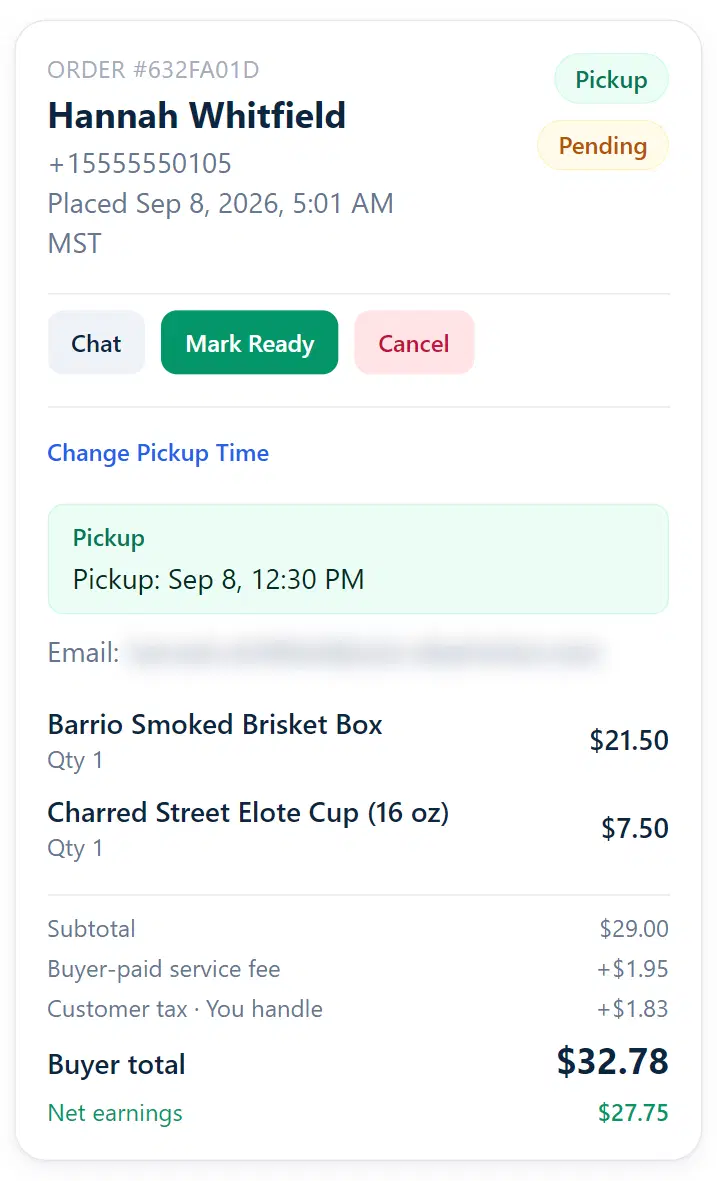
You manage orders on the web, iOS, or Android; buyers order on your web storefront with no app or account. Each order shows who it's for, the pickup time, what they bought, and what you earn, and your order customer list exports to CSV anytime. Starting with baked goods? The home bakery startup steps cover pricing a batch and setting up orders.
Sample shop
Orders and customers
Screenshots from a sample shop.
Orders page
One order: who it's for, the pickup time, what they bought, and your net earnings.
Customers page
Download your list of order customers as a CSV file.
Frequently asked
Common questions.
What is the best app to sell homemade food?
It depends on how you sell: a form for a few requests, a website builder for a site you design, a drop tool for scheduled menu drops, or your own order link for selling directly. VibeKitchen fits Ready Now, Scheduled Batch, and Made to Order menus, without shipping, deposits, or quotes. Compare card processing too, not only the app's own fee.
Is Hotplate an app for selling homemade food?
Yes. As of October 2026, Hotplate Portal, released June 15, 2026, is Hotplate's seller app for iPhone. Sellers use it to manage food drops and orders; buyers order from a web link and don't need it. VibeKitchen also has a seller iPhone app, so on apps the two are even.
Is there an app to sell food from home?
Yes, several. Seller apps like Hotplate and VibeKitchen let buyers order from a web link; marketplace apps have buyers browse many sellers in one app. Check your local food rules first, then compare pickup, payment costs, and customer-list export.
What happened to Castiron?
As of October 2026, the public record is a November 2024 company announcement that T.D. Jakes Enterprises acquired Castiron to launch Nourysh. It doesn't say what happened to individual seller accounts, so check yours and save your records before you move.
Is CottageCMS a website builder or a mobile app?
A website builder. As of October 2026, CottageCMS describes a website and a browser storefront buyers can add to their home screen, with ordering built in. Its pricing page lists Free, Pro, and Scale plans, with Square processing on checkout.
Can customers order without an app or account?
On VibeKitchen, yes: buyers order on your web storefront without installing an app or creating an account. The iOS and Android apps are for sellers. Hotplate also says buyers don't need its seller app; for other services, check their account rules.
What does it cost to take orders with VibeKitchen?
There's no monthly fee. Each order has a 5% + $0.50 service fee, paid by the buyer by default, or you can absorb it. Stripe card processing also comes out of your payout: Stripe's standard US card rate is 2.9% + $0.30, checked October 10, 2026. Other payment types can cost more.
Comparison sources (12)
As of October 2026. Competitor facts come from the public pages below, checked October 10, 2026. Confirm current plans and your account's fees before choosing.
- CottageCMS: browser storefront - accessed October 10, 2026
- CottageCMS: Free, Pro, Scale, Square checkout and plan limits - accessed October 10, 2026
- CottageCMS: website and ordering features - accessed October 10, 2026
- T.D. Jakes Enterprises: Castiron acquisition to launch Nourysh (November 21, 2024) - accessed October 10, 2026
- Hotplate: storefront and drop workflow - accessed October 10, 2026
- Hotplate: platform and processing fees - accessed October 10, 2026
- Hotplate Portal: seller iOS app and version history - accessed October 10, 2026
- Apple release record: Hotplate Portal released June 15, 2026 - accessed October 10, 2026
- Google Forms: web forms and response sheets - accessed October 10, 2026
- Square: US processing rates by payment type and plan - accessed October 10, 2026
- Shopify: US plan and payment pricing - accessed October 10, 2026
- Stripe: US domestic-card processing - accessed October 10, 2026